
In this article, you will learn how to integrate the Mailtarget Page feature with Ghost. There are 2 types of integration here, namely by Embed (users can determine where the page will be displayed) and Pop-Up (users can display pop-ups on their website).
Integration Page Mailtarget to Ghost (Embed)
-
First, create and publish the page.
-
In the page list, click the action 'share.'
-
Select Embed; there is a script to embed the page.
-
Log in to 'Ghost' and then go to the Page 'New Story.'

-
Return to the Mailtarget app share modal and copy the three scripts.
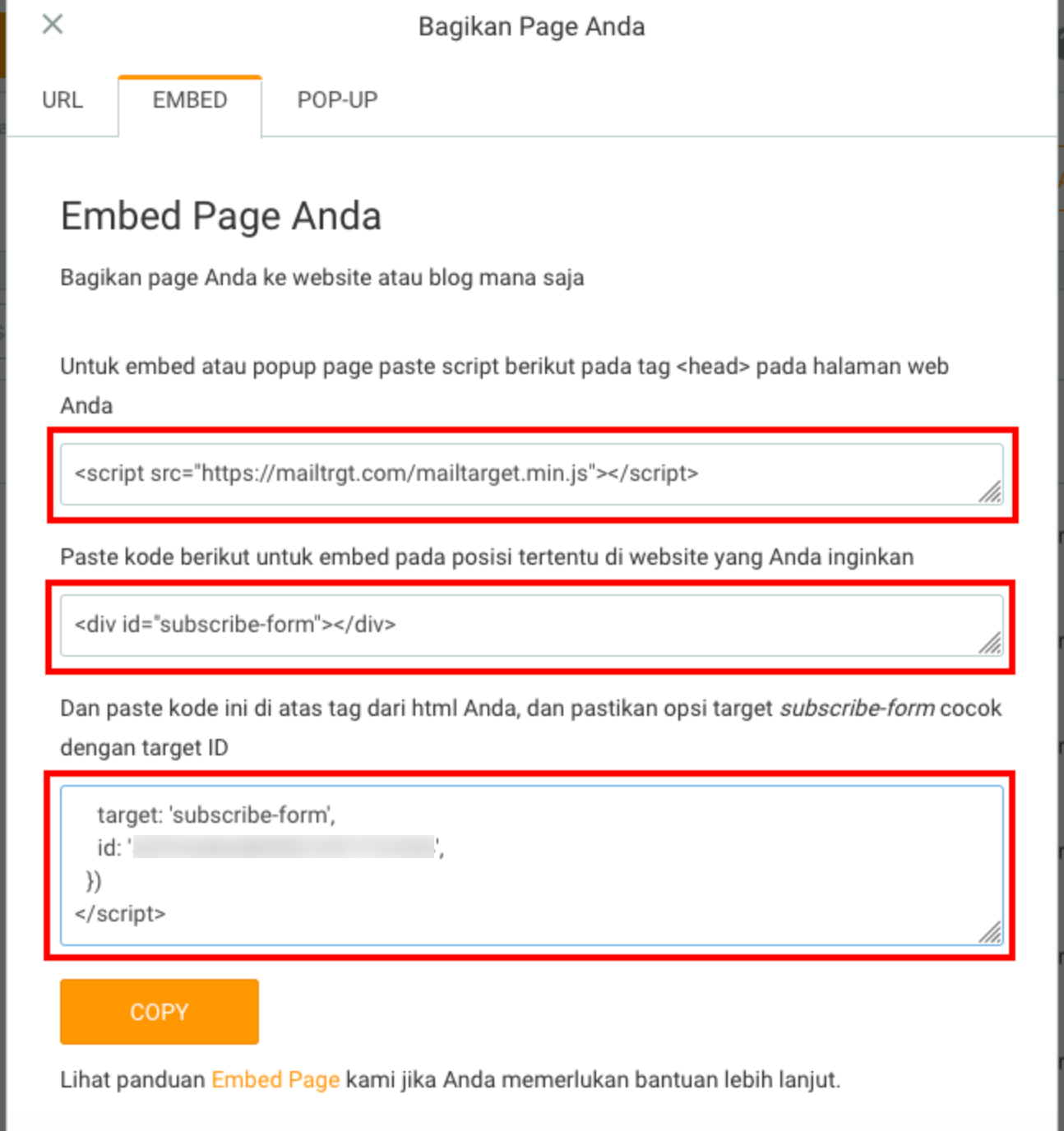
-
Then, on the Ghost editor page, paste all the scripts.

-
Click the 'save' button, then click 'view preview' to see the results.

-
The result will look like this.

Integration Page Mailtarget to Ghost (Pop-Up)
- The way to add an Mailtarget pop-up to Ghost is the same as embedding the page.
- On the Mailtarget app share modal, select 'pop-up,' copy the second script (this step is done if the page has already been embedded).
- On the Ghost editor page, paste the script.

- Click the 'save' button, then click 'view preview'; the results will look like this.
